
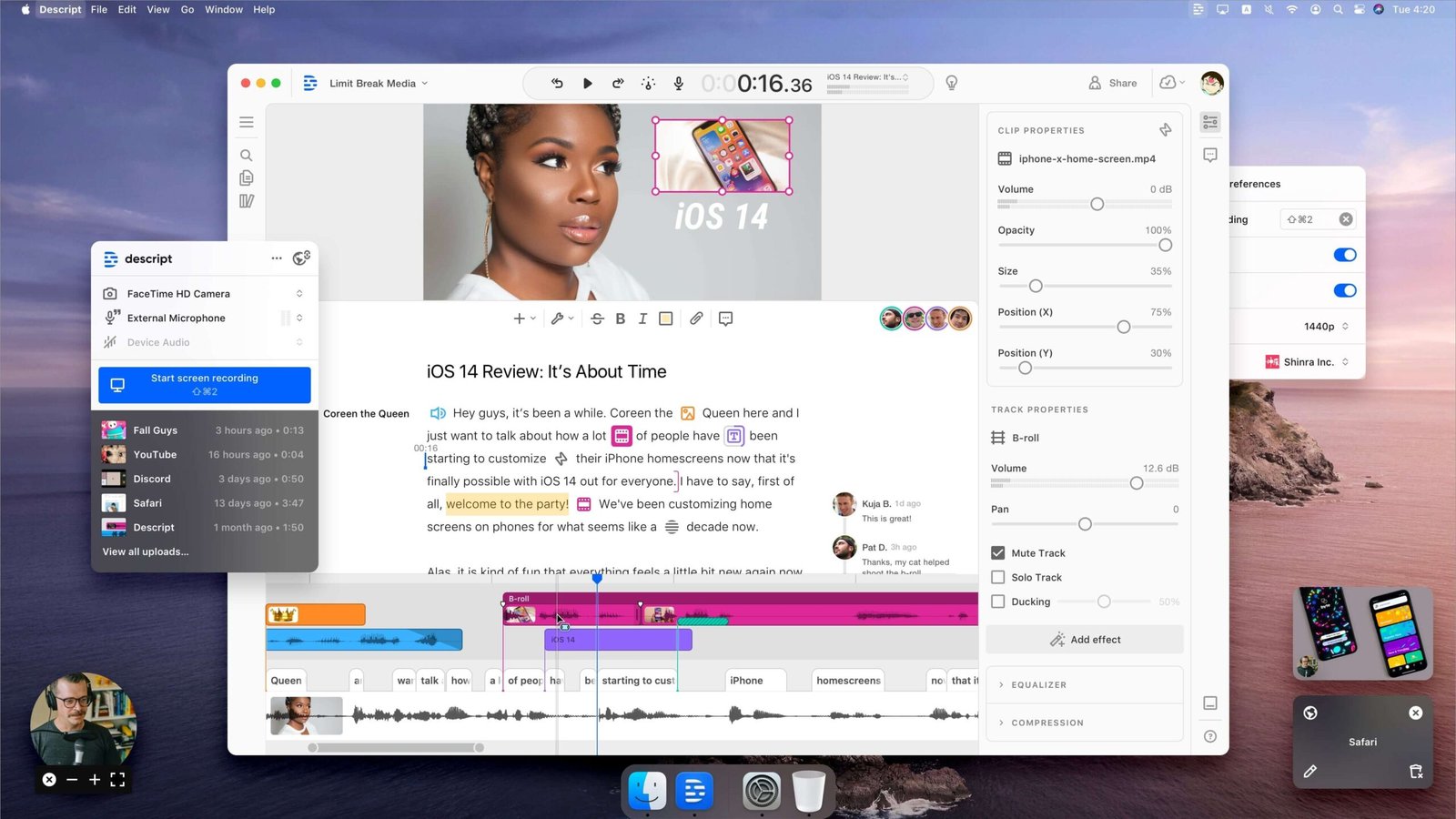
For decades, audio and video editing meant staring at complex, intimidating timelines, endlessly zooming in and out to cut out dead air, filler words, and awkward pauses. If you have ever edited a podcast or a YouTube video in traditional non-linear editors like Premiere Pro or DaVinci Resolve, you know the grind.
But in 2026, the paradigm has officially shifted. Descript has established itself not just as an alternative, but as the gold standard for editing spoken-word content. By treating your video and audio files exactly like a text document, Descript eliminates the steep learning curve of traditional editing.
Whether you are a solo podcaster, a YouTube creator, or part of a bustling marketing team, here is an in-depth look at why Descript is the best AI video editing software on the market today.
What Makes Descript Different? The Magic of Text-Based Editing
The core philosophy behind Descript is beautifully simple: you edit media by editing text.
When you drag and drop an audio or video file into Descript, its advanced transcription engine instantly generates a highly accurate transcript (boasting over 95% accuracy for clear audio). From there, the timeline becomes secondary.
- Cut out a mistake? Just highlight the text and hit backspace. The video cuts seamlessly.
- Rearrange a sentence? Cut and paste the text to a different paragraph. The video instantly reflects the new order.
- Remove filler words? With a single click, Descript’s AI identifies every “um,” “uh,” and “you know” in your recording and deletes them without destroying the natural cadence of your speaker’s voice.
This workflow is a revelation. What used to take three to four hours of tedious timeline scrubbing can now be completed in under 45 minutes. It completely removes the technical barrier to entry, allowing you to focus entirely on the story and the pacing.
Meet Underlord: Your Personal AI Editing Assistant
The biggest leap forward for Descript recently is the introduction of Underlord, a powerful, agentic AI co-editor built right into the platform. Underlord isn’t just a basic generative text tool; it actually understands your project context.
Here is what Underlord can take off your plate:
- Generate Scripts and Outlines: Give Underlord a prompt, and it will draft a script or outline for your next video or podcast.
- Find Highlights and Create Clips: Stop re-watching hour-long interviews to find the best 30-second soundbites. Underlord scans your content, identifies the most engaging moments, and automatically formats them as vertical clips for TikTok, Instagram Reels, and YouTube Shorts.
- Write Show Notes and Chapters: Underlord will automatically generate SEO-optimized YouTube descriptions, podcast show notes, and timestamped chapter markers.
- Vibe Editing: You can give Underlord conversational commands like, “Re-edit this announcement video to feel less like ‘change’ and more like ‘progress’,” or “Center every speaker and add lower thirds,” and it will execute those bulk edits in seconds.
Game-Changing AI Features for Flawless Production
Beyond text-based editing and Underlord, Descript is packed with a suite of AI tools designed to fix production mistakes and elevate your content quality—even if you recorded in a noisy room with a cheap webcam.
1. Studio Sound
You don’t need a $400 microphone or a sound-treated room anymore. Descript’s Studio Sound uses regenerative AI to instantly remove background noise, echo, and room reverb while enhancing your voice to sound like it was recorded in a professional broadcast studio. It is arguably the best one-click audio repair tool in the industry.
2. Overdub (AI Voice Cloning)
Did you mispronounce a name or state the wrong year during a 45-minute recording? Instead of setting up your camera and mic to re-record that one sentence, you can use Overdub. By training Descript on just a few minutes of your voice, you can simply type the correct word into the transcript, and Descript will seamlessly generate the new audio in your exact voice.
3. AI Eye Contact
Reading from a script often breaks connection with the audience because your eyes are darting off-camera. Descript’s Eye Contact feature uses AI to subtly adjust your gaze, making it look as though you are staring directly into the lens the entire time.
4. AI Green Screen & Avatars
Don’t want to clean your messy room before filming? Descript can effortlessly scrub out your background without a physical green screen. And if you don’t want to be on camera at all, you can choose from a gallery of AI Avatars (or create a custom one), feed it a script, and let the avatar do the talking for you.
Who is Descript Best For?
While Descript has advanced multi-track capabilities, it isn’t trying to replace high-end VFX software for Hollywood films. It is purpose-built for creators who rely on spoken-word content:
- Podcasters: Both audio and video podcasters will save days of editing time. With Descript’s Squadcast integration, you can also record remote guests in local studio quality directly into your Descript project.
- YouTubers & Video Marketers: The ability to instantly generate captions, apply templates, auto-reframe for mobile, and use Underlord to find viral clips makes Descript a powerhouse for fast content output.
- Course Creators & Educators: The built-in screen recorder and teleprompter make recording tutorials and online courses incredibly fluid. You can record your screen and camera, make a mistake, keep rolling, and then just delete the bad take from the text later.
Pricing: Is Descript Worth It?
Descript offers highly competitive pricing tiers designed to scale with your content output:
- Free Tier: $0/month. Perfect for testing the waters. Gives you 1 hour of transcription per month, 100 AI credits, and 720p watermarked exports.
- Hobbyist: ~$24/month. Ideal for casual creators. Includes 10 hours of transcription, 400 AI credits, watermark-free 1080p exports, Studio Sound, and access to Underlord.
- Creator: ~$35/month. The sweet spot for most active creators. Offers 30 transcription hours, 4K exports, 800 AI credits, and unlimited access to the royalty-free stock media library.
- Business: Starts at ~$40-$50/month. Adds team-wide Brand Studio access, advanced language dubbing, custom avatars, and priority support.
(Note: Pricing scales favorably if you choose annual billing).
The Verdict: Stop Scrubbing Timelines
Content creation is a race against burnout, and editing is usually the biggest bottleneck. Descript solves this by turning a highly technical, tedious process into something as simple as writing a document.
Between its flawless text-based editing, the magic of Studio Sound, and the heavy lifting done by the Underlord AI assistant, Descript doesn’t just save you time—it fundamentally changes how you approach creating video and audio.
If you create spoken-word content and haven’t tried Descript yet, you are working too hard.
Ready to revolutionize your workflow? Start editing for free on Descript.com today.